E-Wallet Payment Flow (Online)
App-to-app checkout via Fiuu Mobile XDK for TNG eWallet, GrabPay, ShopeePay, and Boost.
The merchant app starts the XDK with order number, amount, and channel. The XDK talks to the Fiuu Gateway, the gateway talks to the e-wallet provider, and the wallet app completes the payment. The user returns to your app through a deeplink, and your server confirms the result with IPN / callback plus checksum verification.
Download the flow diagram (PDF)
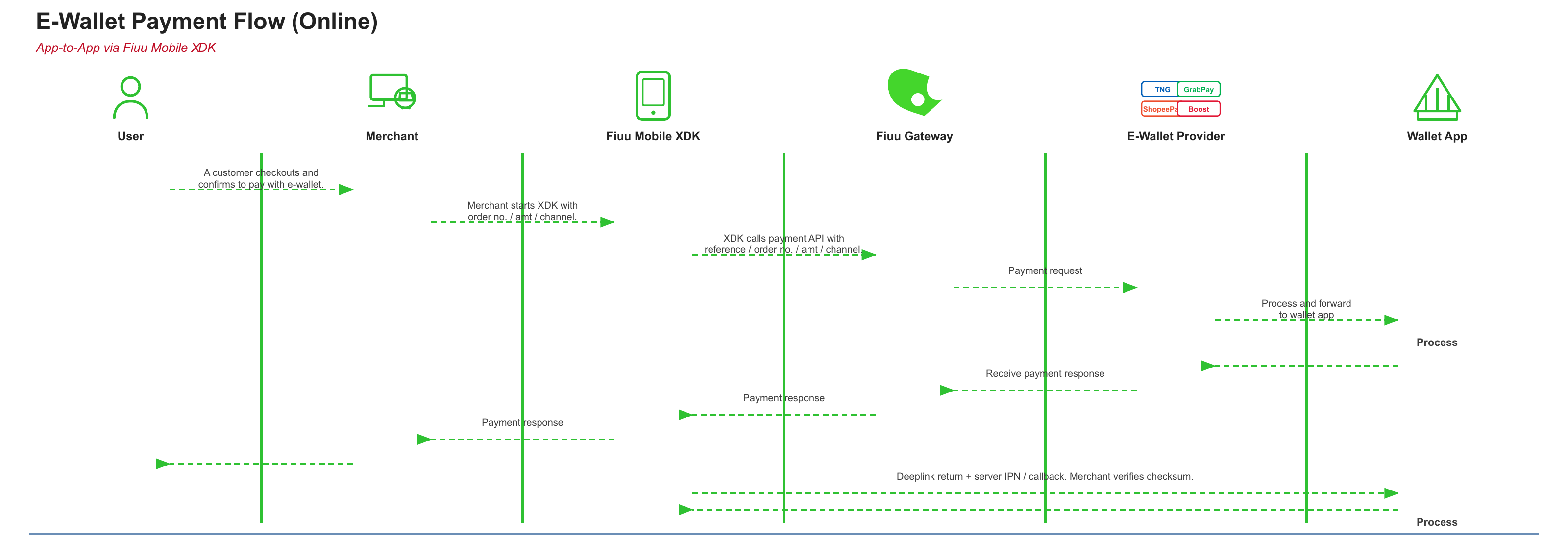
Actors
| Actor | Role |
|---|---|
| User | Checks out in the merchant app and confirms e-wallet payment |
| Merchant | Starts the XDK with order number, amount, and channel |
| Fiuu Mobile XDK | Calls the Fiuu payment API and returns the payment response to the app |
| Fiuu Gateway | Routes the payment request to the e-wallet provider and returns the response |
| E-Wallet Provider | TNG, GrabPay, ShopeePay, or Boost — processes the request and forwards it to the wallet app |
| Wallet App | User authenticates and pays inside the wallet app |
Sequence
- The customer checks out and confirms payment with an e-wallet.
- The merchant app starts the XDK with order number, amount, and channel.
- The XDK calls the Fiuu payment API with reference / order number / amount / channel.
- Fiuu Gateway sends a payment request to the e-wallet provider.
- The provider processes the request and forwards it to the wallet app.
- The wallet app processes the payment (user authenticates and confirms).
- The provider receives the payment response and returns it to Fiuu Gateway.
- The gateway returns the payment response to the XDK, then to the merchant app.
- The wallet app deeplinks back to the merchant app. Fiuu also sends a server IPN / callback. The merchant verifies the checksum before fulfilling the order.
Do not fulfil the order from the in-app result alone. Confirm the IPN / callback and verify the checksum on your backend. See Response Handling.
Start the XDK for e-wallet
Use a subscribed channel code. For a direct (express) jump into one wallet, set mp_express_mode and mp_channel:
paymentDetails['mp_express_mode'] = true;
paymentDetails['mp_channel'] = 'TNG-EWALLET';
Common online e-wallet channels (Malaysia / MYR):
| Wallet | Channel code |
|---|---|
| Touch 'n Go eWallet | TNG-EWALLET |
| GrabPay | GrabPay |
| ShopeePay | ShopeePay |
| Boost | BOOST |
Confirm the exact code for your account in the channel list. You can only use channels you are subscribed to.
To show several wallets on the listing page instead of jumping to one:
paymentDetails['mp_channel'] = 'multi';
paymentDetails['mp_allowed_channels'] = ['TNG-EWALLET', 'GrabPay', 'ShopeePay', 'BOOST'];
See Core Integration for express mode, environment, and channel filtering.
Deeplink return
After the wallet app finishes, the user returns to your app through the App Url / Deeplink registered on the Fiuu Merchant Portal (for example yourappscheme://).
Without a working deeplink, the user can be left in the wallet app and your in-app result callback may not fire.
Configure Android intent filters, iOS URL Types, and portal registration in Deeplink Redirection Setup.
Server IPN / callback and checksum
Two results can arrive:
| Path | What it is | What to do |
|---|---|---|
| XDK payment response | JSON returned to the app after the XDK closes | Parse it, then verify on the server |
| Server IPN / callback | Server-to-server notification from Fiuu | Treat this as the source of truth and verify chksum |
Standard checksum:
chksum = MD5(mp_merchant_ID + msgType + txn_ID + amount + status_code + secret_key)
If you use a private secret key (recommended), mp_secured_verified in the client result is always false. Ignore it and verify on the server. Full formulas and status codes are in Response Handling.
Related guides
- Payment Parameters —
mp_channel,mp_express_mode,mp_allowed_channels - Core Integration — environments and express mode
- Deeplink Redirection Setup — return to your app after wallet payment
- Response Handling — result JSON, IPN checksum, status codes