Getting Started
This page assumes you've already completed Credential Setup and have your Google Play Integrity credentials, project number, and Fiuu attestation/keyloading host details on hand.
Code samples on this and the following pages are Java, matching the SDK's
real, working reference integrations (topnewroute-*.aar consumers).
Add the SDK to Your Project
-
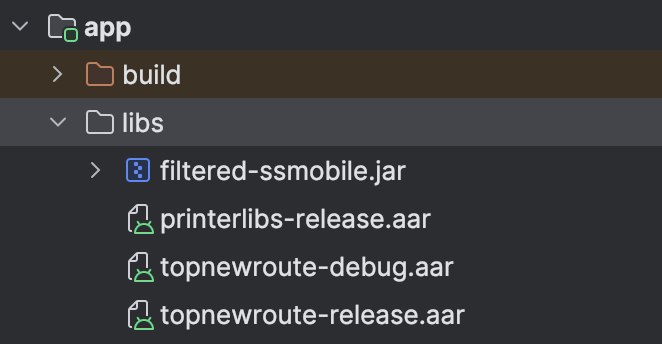
Copy the ToP SDK AAR files into
app/libs/:topnewroute-debug.aartopnewroute-release.aar
-
Declare the dependency in
app/build.gradle:// Add at the top of build.gradlerepositories {flatDir {dirs 'libs'}}// In the dependencies blockimplementation files("libs/filtered-ssmobile.jar")debugImplementation fileTree(dir: "libs", include: ["*.jar", "*.aar"], exclude: ["topnewroute-release.aar"])releaseImplementation fileTree(dir: "libs", include: ["*.jar", "*.aar"], exclude: ["topnewroute-debug.aar"])This keeps the debug and release AARs from colliding — debug builds pull in
topnewroute-debug.aar, release builds pull intopnewroute-release.aar. -
Sync Gradle.
The sample Testing App (TopTesterNewRoute) itself requires Android
Gradle Plugin 7.3.0 — that's a constraint on the tooling used to build the
sample app, not a requirement on your own app's AGP version.
Declare Required Permissions
Add these to your AndroidManifest.xml:
<uses-feature android:name="android.hardware.telephony" android:required="false" />

<uses-permission android:name="android.permission.INTERNET" />
<uses-permission android:name="android.permission.NFC" />
<uses-permission android:name="android.permission.VIBRATE" />
<uses-permission android:name="android.permission.ACCESS_FINE_LOCATION" />
<uses-permission android:name="android.permission.ACCESS_COARSE_LOCATION" />
Initialize the SDK
Implement TapSDK.TapCallback and initialize the SDK — typically in your
main activity's onCreate():
TapSDK tapSDK = new TapSDK();

String uniqueId = "your-uniqueId"; // retrieve in MerchantPortal
String vKey = "your-vkey"; // retrieve in MerchantPortal
String country = "MY";

FasstapSDKConfiguration configuration = FasstapSDKConfiguration.Builder
        .create()
        .setAttestationHost(BuildConfig.ATTESTATION_HOST)
        .setAttestationHostCertPinning(BuildConfig.ATTESTATION_CERT_PINNING)
        .setAttestationHostReadTimeout(10000L)
        .setAttestationRefreshInterval(300000L)
        .setAttestationStrictHttp(true)
        .setAttestationConnectionTimeout(30000L)
        .setKeyloadingHost(BuildConfig.KEYLOADING_HOST)
        .setKeyLoadingHostCertPinning(BuildConfig.KEYLOADING_HOST_CERT_PINNING)
        .setKeyLoadingCACert(BuildConfig.KEYLOADING_CA_CERT)
        .setLibGooglePlayProjNum(BuildConfig.GOOGLE_PROJECT_NUMBER)
        .setLibAccessKey(BuildConfig.ACCESS_KEY)
        .setLibSecretKey(BuildConfig.SECRET_KEY)
        .setIsProductionMode(false) // true for production
        .build();

boolean isOptIn = true;       // card priority; default true — contact Fiuu support to change
boolean shufflePinPad = true; // shuffle PIN pad digit layout; default true

tapSDK.init(this, vKey, "SDK", country, isOptIn, shufflePinPad, configuration, new TapSDK.TapCallback() {
    @Override
    public void onLog(String s) {
        Log.d("TapSDK", s);
    }

    @Override
    public void onError(String s) {
        Log.e("TapSDK", "onError " + s);
    }

    @Override
    public void onRequireUserAction(RecoverableAction recoverableAction) {
        Log.d("TapSDK", String.valueOf(recoverableAction));
    }

    @Override
    public void onLoginSuccess() {
        // SDK is logged in and ready — safe to call startTransactionFlow now.
    }

    @Override
    public void onCardStatus(int status) {
        // Card presence/read events — see Flow Overview.
    }

    @Override
    public void onTransactionUIEvent(int event) {
        // UI-driving events, including the signature-required event —
        // see Capture Signature.
    }

    @Override
    public void onTransactionResult(int resultCode, String json) {
        // Final transaction outcome — see Flow Overview for the result
        // field reference and Appendixes for status codes.
    }
});

tapSDK.loginWithResetProvision(this, uniqueId);
BuildConfig values are issued by FiuuATTESTATION_HOST, ATTESTATION_CERT_PINNING, KEYLOADING_HOST,
KEYLOADING_HOST_CERT_PINNING, KEYLOADING_CA_CERT,
GOOGLE_PROJECT_NUMBER, ACCESS_KEY, and SECRET_KEY aren't values you
choose yourself — Fiuu issues them per environment (UAT vs. production) and
per merchant, the same way vKey is issued. Wire them into build.gradle
as buildConfigField entries (or your own secrets-management setup) rather
than hardcoding literals in source.
init(...) Parameters
| Parameter | Meaning |
|---|---|
this | Context — typically the calling Activity. |
vKey | Merchant verification key issued by Fiuu. |
"SDK" | Fixed label argument — always pass the literal string "SDK". |
country | ISO country code, e.g. "MY". |
isOptIn | Determines card priority — set to MyDebit first when true. Defaults to true; contact Fiuu support to change. |
shufflePinPad | Whether the PIN pad's digit layout is shuffled. Defaults to true. |
configuration | The FasstapSDKConfiguration built above. |
new TapSDK.TapCallback() { ... } | Your callback implementation for SDK events. |
Once onLoginSuccess() fires, the SDK is ready. Continue to
Start a Transaction.